You have two CTR tools open in separate tabs and a campaign budget waiting on the decision. Pick wrong and you burn days on setup, miss your target keywords, and end up with traffic you cannot verify. This comparison settles it with specifics.
You will see how CTRTool and Kraken differ on platform coverage, screenshot proof per visit, and campaign controls like desktop versus mobile targeting and daily search counts. By the end, you will know which tool fits your campaigns and why, plus a clear verdict instead of a hedge.
Quick Verdict: Kraken vs CTRTool for CTR Campaigns
CTRTool wins on verifiable proof and transparent per-visit screenshots, while Kraken appeals to teams wanting a broader automation suite with less emphasis on proof artifacts. For CTR campaign work aimed at search engine rankings, that difference matters more than raw feature count. Proof you can inspect is what separates a credible campaign from a hopeful one.
CTRTool is built around a simple promise: every visit leaves evidence. Each one produces a search screenshot and a landing screenshot as separate proof images, along with the full visit path. Campaigns also track keyword positions over time, including Maps listing order and AI citation order. That gives you a record of both the click and the ranking movement it was meant to influence.
Kraken, by general reputation, leans toward a wider automation toolkit. Public information on its CTR campaign specifics is thinner, so treat any claim about its proof output or targeting depth as something to verify directly. If documentation and evidence matter to your workflow, ask for samples before committing.
| Comparison point | CTRTool | Kraken |
|---|---|---|
| Proof artifacts | Search and landing screenshots as separate proof images for every visit, plus full visit paths | Broader automation focus; proof output is not clearly documented in public material, so confirm before relying on it |
| Platform coverage | CTR campaigns across campaign types, websites and keywords, with keyword positions tracked over time including Maps listing order and AI citation order | Positioned as a wider automation suite; exact coverage of search platforms and ranking views should be checked directly |
| Targeting controls | Desktop and Mobile CTR choices, visits up to 5 minutes with up to 5 additional internal pages, and location requests that cannot be verified use no credits | Automation-oriented controls are implied by its suite framing; specific targeting options are best confirmed with the vendor |
| Pricing transparency | Pay-for-results credit model, no credits charged for technical failures before landing, one shared credit balance across all campaigns, and unused credits roll over while subscribed | Pricing structure is not detailed in public sources; request current terms and billing rules |
Choose CTRTool if you need screenshot proof for every visit, clear Desktop and Mobile CTR choices, and a pay-for-results model where failed technical attempts cost nothing. Consider Kraken if a broader automation toolkit is your priority, and verify its CTR proof and billing terms first.
At a glance: how CTRTool compares to Kraken on the features that matter most.
| Feature | CTRTool | Kraken |
|---|---|---|
| Pricing | $59-$699/mo | 0.010%-0.027% fees |
| Free plan / trial | ✗ | — |
| API access | — | ✓ |
| Mobile app | — | ✓ |
| Live chat / voice support | Email support | Voice + contact form |
| Recurring / automated orders | ✓ | ✓ |
| Screenshot proof per visit | ✓ | — |
| Pay-per-result credit model | ✓ | — |
What Is CTRTool?
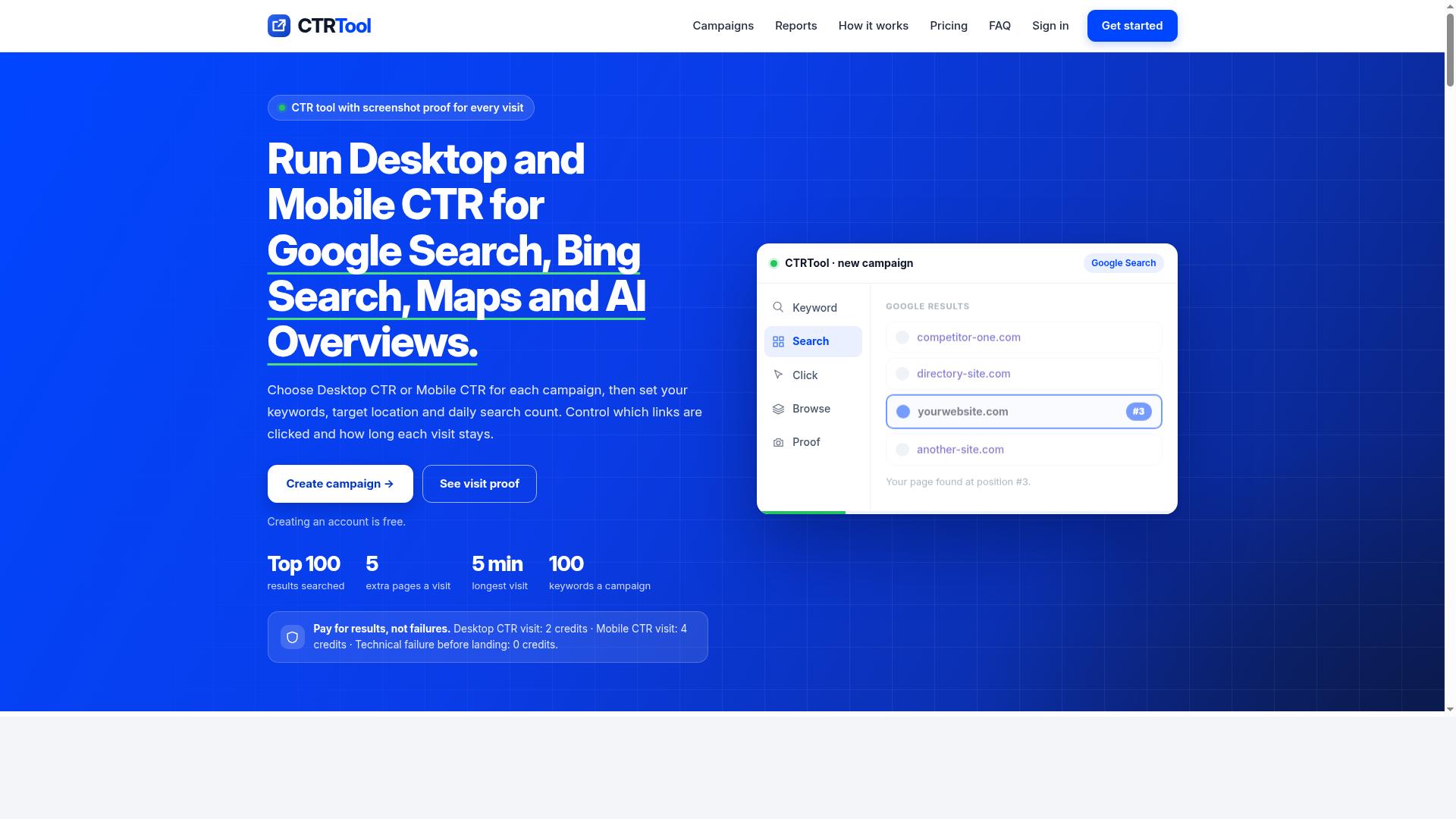
CTRTool is a CTR campaign tool that runs Desktop and Mobile CTR campaigns for Google Search, Bing Search, Maps and AI Overviews, with screenshot proof for every visit. It is built for SEO practitioners who want to test how click-through rate and behavioral signals interact with keyword rankings, without guessing whether a visit actually happened.
Each campaign covers one surface and one device type. That means users pick Desktop CTR or Mobile CTR per campaign, then set keywords, target location and daily search count. Splitting device types keeps mobile and desktop click patterns from blending into one noisy data set.
Campaign setup follows clear eligibility rules, which keeps results readable:
- Google Search and Bing Search campaigns require the keyword to appear in the top 100 organic results.
- Google Maps campaigns check up to 50 listings before a visit runs.
- AI Overviews campaigns need a matching citation for the target query.
Users also control which links are clicked and how long each visit stays. That level of control matters because dwell time and session duration are the behavioral signals most often tied to engagement metrics in ranking discussions.
The core promise is proof. Every visit produces screenshots, with the search screenshot and the landing screenshot captured as separate proof images, plus the full visit path. For anyone comparing tools, that evidence trail is the difference between a CTR campaign and an unverifiable claim about automated clicks.
CTRTool is aimed at SEO teams and site owners working on keyword position movement who want documented campaign activity they can review alongside search console data and SERP tracking. The site is direct about limits too: automated visits do not guarantee rankings. Treat CTRTool as a controlled testing layer for behavioral signals, not a replacement for on-page SEO, technical SEO or link building.
What Is Kraken?
Kraken is generally described as a click-automation or CTR tool used by some SEO practitioners to simulate organic clicks, but its exact feature set and pricing should be verified directly with the vendor.
In SEO communities, the name comes up alongside discussions of CTR campaigns and behavioral signals. The tool is typically referenced in the context of sending automated clicks to pages in an effort to influence search engine rankings. Descriptions of how it works vary widely from one discussion to the next.
Details vary by version and vendor, so treat forum posts and third-party write-ups as starting points rather than specifications. Confirm current capabilities, terms, and any limitations directly before relying on them.
- How clicks are sourced and whether proxy networks are included
- Which search engines and regions are supported
- How IP rotation, user agents, and browser fingerprinting are handled
- Reporting, dwell time controls, and campaign safeguards
Because public information is thin and inconsistent, readers comparing options should ask vendors direct questions and check terms of service. That approach keeps expectations grounded and avoids surprises later.
Features Compared
This section compares the two tools across three practical dimensions: where campaigns can run, how visits are proven, and how much control users have over targeting and daily search counts.
The first part covers platform coverage, meaning which search surfaces and features each tool can work with. The second looks at proof and transparency, or what evidence you receive that a visit actually happened as requested.
The third examines campaign controls, including device choice, geographic targeting and daily search limits. CTRTool details in this section come from its published documentation. Kraken is described in general terms only, and any gap in its public material should be confirmed directly with the vendor before you commit.
Platform Coverage: Search, Maps and AI Overviews
CTRTool explicitly supports Google Search, Bing Search, Google Maps and AI Overviews campaigns, while Kraken's platform coverage is not clearly documented and should be confirmed with the vendor.
Each CTRTool campaign type maps to a specific surface and a specific action. That matters for anyone running a CTR campaign aimed at search engine rankings, because a Maps click and an organic result click send very different behavioral signals.
| Surface | CTRTool | Kraken (general) |
|---|---|---|
| Google Search | Search keyword, click organic result, top 100 results, internal pages supported | Not clearly documented |
| Bing Search | Same keyword and organic click flow for Bing | Not clearly documented |
| Google Maps | Find business listing, click its website link, up to 50 listings (about five pages), city targeting | Not clearly documented |
| AI Overviews | Find website in the overview and click its source link, requires a matching citation | Not clearly documented |
The AI Overview campaign is worth noting because it requires a matching citation. In other words, your site needs to already appear as a source in the overview, which keeps the campaign tied to real visibility rather than wishful targeting.
For Kraken, readers should treat coverage as an open question. Ask the vendor which surfaces are supported, whether Maps and AI features are included, and whether Bing is handled at all.
Proof and Transparency: Screenshot Verification per Visit
CTRTool's defining feature is screenshot proof for every visit, with search and landing screenshots delivered as separate proof images alongside the full visit path.
That means you can see the query as it was searched and the page as it was reached, rather than trusting a summary count. Reports also track keyword positions over time, covering Search positions, Maps listing order and AI citation order, so you can watch a keyword ranking move across sessions.
Transparency matters in this category because automated clicks sit close to bot traffic and black hat SEO tactics. Without artifacts, a buyer cannot easily separate genuine visits from inflated numbers. Separate proof images and a recorded path give you something concrete to audit.
For Kraken, proof artifacts are not clearly documented in public material. Before buying, request sample reports and ask whether screenshots are provided per visit, whether they are split between search and landing, and whether position tracking is included.
If a vendor cannot show you a sample report, treat the claim as unverified. CTRTool's pay-for-results credit model reinforces this: no credits are charged for technical failures before landing.
Campaign Control: Desktop vs Mobile, Targeting and Daily Search Counts
CTRTool lets users choose Desktop CTR or Mobile CTR per campaign, target a country with optional state and city (or 'Any country'), and set daily search counts.
- Device choice: Desktop or Mobile selected per campaign, delivered through Desktop Chrome windows and real Android phone sessions matched to the target location through managed proxy routes.
- Geographic targeting: Country plus optional state and city, or 'Any country' to use a mix of supported locations.
- Daily search counts: Now, spread out or gap timing, with days, hours and time zone settings. Daily goals reset at 00:00 UTC.
- Campaign scale: Up to 100 keywords per campaign, search depth up to 100, and up to 100 campaigns.
- Visit depth: Target URL, internal page URLs and link text, click order, scrolling time, up to five additional pages per visit, and visits up to five minutes total.
- Availability: Global online service with no country restrictions stated.
These controls let you shape engagement metrics such as dwell time and session duration rather than sending a single shallow click. That aligns a CTR campaign with the behavioral signals a search algorithm may weigh.
For Kraken, control depth is not clearly documented and should be verified. Ask specifically about device selection, city-level targeting and daily pacing before comparing the two tools on equal terms.
Pricing Compared
CTRTool publishes monthly USD plans: Starter at $59/month for 2,000 credits (up to 1,000 Desktop or 500 Mobile CTR visits) and Growth at $125/month for 5,000 credits (up to 2,500 Desktop or 1,250 Mobile visits). Scale and Agency tiers extend the same structure for heavier campaigns.
| Plan | Monthly Price | Credits | Desktop Visits | Mobile Visits |
|---|---|---|---|---|
| Starter | $59 | 2,000 | Up to 1,000 | Up to 500 |
| Growth (Recommended) | $125 | 5,000 | Up to 2,500 | Up to 1,250 |
| Scale | $399 | 20,000 | Up to 10,000 | Up to 5,000 |
| Agency | $699 | 40,000 | Up to 20,000 | Up to 10,000 |
The credit-to-visit conversion is simple. A Desktop CTR visit costs 2 credits, while a Mobile CTR visit costs 4 credits, so mobile campaigns draw down the balance roughly twice as fast.
Unused credits roll over while a subscription stays active and expire once cancellation takes effect. Creating an account is free, and prices are marked to rise 30% on November 15.
Kraken's pricing is not published in this comparison. Confirm current rates directly with the vendor before budgeting a Kraken CTR campaign.
Who Should Choose CTRTool
CTRTool fits SEO practitioners and agencies who need auditable CTR campaigns across Google Search, Bing Search, Maps and AI Overviews and must show clients proof for every visit. The platform is built for teams running CTR campaigns for their own or client websites, including the tier links, PBNs and test properties mentioned in its guidance.
Where Kraken tends to appeal to users who want a lean, single-purpose click tool, CTRTool is aimed at practitioners who treat a CTR campaign as something that has to be documented and defended. That distinction shapes the buyer profiles below.
Use this list to check whether your workflow matches the tool before you commit to either platform.
- Agencies needing client-ready proof: separate search and landing screenshots give you evidence to attach to reports for every visit.
- Teams running Desktop and Mobile campaigns separately: device-specific campaign setup keeps each stream distinct instead of blending results together.
- Local SEO teams targeting Maps listings: up to 50 listings can be checked, which suits multi-location clients.
- Teams testing AI Overview citations: campaigns can target AI Overviews alongside traditional search results.
- Multi-market campaigns: global targeting supports practitioners running the same campaign across several regions.
Each of these profiles shares one trait. The practitioner has to answer a question later, whether from a client, a stakeholder or their own records, about what happened during the campaign. Auditable output matters more than raw click volume in those situations.
A solo site owner chasing a quick bump in organic traffic on a single property may find either tool workable. A team juggling several clients, devices and markets will feel the difference in reporting and targeting depth, and that is where CTRTool's design pays off.
If your campaigns span Google Search, Bing Search, Maps and AI Overviews at once, the deciding factor is usually coverage and evidence rather than price. CTRTool is positioned for exactly that combination.
Who Should Choose Kraken
Kraken may suit users who want a broader click-automation toolkit and are comfortable verifying feature depth, proof artifacts and pricing directly with the vendor. If your priority is a wide menu of automation options rather than per-visit evidence, it can be worth a closer look.
That fit tends to appeal to teams prepared to test results themselves and validate outcomes through their own SERP tracking and analytics. Users who prefer to confirm every claim hands-on often gravitate toward this kind of general-purpose toolset.
Before committing, book a vendor call and run a small trial. Confirm how the platform handles proxy networks, IP rotation and browser fingerprinting, and check whether reporting gives you the per-visit proof you need. Pricing and feature depth should be verified directly rather than assumed.
In short, Kraken fits buyers who value breadth, accept a self-driven validation process, and treat any CTR campaign as something to measure against real keyword ranking movement before scaling spend.
Final Verdict
For teams that need verifiable CTR campaigns with screenshot proof for every visit across Google Search, Bing Search, Maps and AI Overviews, CTRTool is the clearer choice; Kraken remains a general alternative to evaluate directly. The deciding factor is proof. CTRTool separates search and landing screenshots into distinct proof images for every visit, and it tracks keyword positions over time, including Maps listing order and AI citation order.
Platform coverage and transparent pricing reinforce that lead. A pay-for-results credit model means no credits are charged for technical failures before landing, and visits that cannot verify the requested location use no credits. One credit balance is shared across all campaign types, websites and keywords, with up to 100 campaigns holding 100 keywords each.
Kraken, by contrast, is best treated as a general alternative. Its specifics should be confirmed with the vendor before you commit, since details on proof methods, platform reach and pricing are not something this comparison can vouch for. That gap in verifiable detail matters when the whole point of a CTR campaign is trustworthy evidence.
If proof, coverage and clear costs are what your search engine rankings work depends on, the next step is simple: visit ctrtool.com to see the platform, or contact support at vaibhav@autoblogging.ai with any questions about campaigns, credits or tracking.
Frequently Asked Questions
What is the main difference between Kraken and CTRTool?
Kraken is a cryptocurrency exchange, while CTRTool is an SEO software tool built for running CTR campaigns on Google Search, Bing Search, Google Maps and AI Overviews. CTRTool lets you choose Desktop or Mobile CTR per campaign, set keywords and target locations, and it provides screenshot proof for every visit. The two products serve entirely different purposes, so they aren't direct substitutes.
Does CTRTool offer screenshot proof like Kraken provides trading records?
Yes - screenshot proof is a core part of CTRTool. Every visit includes search and landing screenshots as separate proof images, along with full visit paths, so you can verify each campaign result. This makes CTRTool's reporting transparent and results-focused for SEO practitioners and agencies.
How does CTRTool's pricing compare to Kraken's fees?
CTRTool uses simple monthly plans in USD: Starter at $59/month for 2,000 credits (up to 1,000 Desktop CTR visits or 500 Mobile CTR visits) and Growth at $125/month for 5,000 credits (up to 2,500 Desktop or 1,250 Mobile visits). Kraken's published fees relate to crypto margin trading rather than subscriptions, so the two pricing models aren't directly comparable. For exact Kraken costs, check Kraken's own fee schedule.
Which platforms and campaign types does CTRTool support?
CTRTool runs campaigns for Google Search, Bing Search, Google Maps and AI Overviews, with Desktop or Mobile CTR selectable per campaign. You can target a specific country and optionally a state and city, or choose "Any country" for a mix of supported locations. Maps campaigns check up to 50 listings, and AI Overview campaigns require a matching source link.
Can I run CTR campaigns for client websites with CTRTool?
Yes. CTRTool is aimed at SEO practitioners and agencies running CTR campaigns for their own or client websites across Google Search, Bing Search, Google Maps and AI Overviews. Campaigns can target internal pages, and keyword positions are tracked over time, including Maps listing order and AI citation order. Note that the page must appear within the top 100 organic results for the chosen keyword and location.
Is CTRTool a global service, and how do I get support?
CTRTool is a global online service with no stated country restrictions, and campaigns can target a chosen country, state and city. Support is available via the email listed in the site's FAQ: vaibhav@autoblogging.ai. The site also includes pages for Support, Terms of use and Legal notices.